# Service Operations

> Browse PeopleSoft Integration Broker service operations with versions, handlers, routings, security grants, and IB transaction history.

---

Site [llms.txt](/llms.txt)

---

<div id="pslens-context-panel" class="card border-info mb-4 d-none">
  <div class="card-header bg-light text-info py-2 fw-bold d-flex align-items-center border-bottom border-info-subtle">
    <i class="bi bi-info-circle-fill me-2"></i>
    <span>Tailored Operational Context</span>
  </div>
  <div class="card-body p-0">
    <ul class="list-group list-group-flush">
      <li id="row-db" class="list-group-item d-flex align-items-center justify-content-between py-2 d-none">
        <strong>Target Database:</strong>
        <span id="ctx-db" class="badge bg-secondary font-monospace">&mdash;</span>
      </li>
      <li id="row-type" class="list-group-item d-flex align-items-center justify-content-between py-2 d-none">
        <strong>Context Type:</strong>
        <span id="ctx-type" class="badge bg-light text-dark border font-monospace text-uppercase">&mdash;</span>
      </li>
      <li id="row-severity" class="list-group-item d-flex align-items-center justify-content-between py-2 d-none">
        <strong>Alert Severity:</strong>
        <span id="ctx-severity" class="badge">&mdash;</span>
      </li>
      <li id="row-time" class="list-group-item d-flex align-items-center justify-content-between py-2 d-none">
        <strong>Triggered Time:</strong>
        <span id="ctx-time" class="text-muted small">&mdash;</span>
      </li>
      <li id="row-details" class="list-group-item py-2 d-none">
        <strong id="label-details" class="d-block mb-1">Firing Context:</strong>
        <code id="ctx-details" class="d-block p-2 bg-light border rounded small"
          style="white-space: pre-wrap; word-break: break-all;">&mdash;</code>
      </li>
      <li id="row-sql" class="list-group-item py-2 d-none">
        <div class="d-flex justify-content-between align-items-center mb-1">
          <strong id="label-sql">Contextual SQL:</strong>
          <button id="btn-copy-sql" type="button" class="btn btn-sm btn-outline-secondary py-0 px-2 small">
            <i class="bi bi-clipboard me-1"></i>Copy SQL
          </button>
        </div>
        <pre class="mb-0 p-2 bg-light border rounded small"><code id="ctx-sql" style="white-space: pre-wrap; word-break: break-word;">&mdash;</code></pre>
      </li>
    </ul>
  </div>
</div>

<script>
  (function () {
    const params = new URLSearchParams(window.location.search);
    const metadata = params.get('metadata');
    if (!metadata) return;

    try {
      
      const base64 = metadata.replace(/-/g, '+').replace(/_/g, '/');
      const jsonStr = decodeURIComponent(escape(window.atob(base64)));
      const data = JSON.parse(jsonStr);

      if (data) {
        let hasData = false;

        if (data.db) {
          document.getElementById('ctx-db').textContent = data.db;
          document.getElementById('row-db').classList.remove('d-none');
          hasData = true;
        }

        if (data.type) {
          document.getElementById('ctx-type').textContent = data.type;
          document.getElementById('row-type').classList.remove('d-none');
          hasData = true;
        }

        if (data.severity) {
          const severityBadge = document.getElementById('ctx-severity');
          const severity = data.severity.toLowerCase();
          severityBadge.textContent = severity.toUpperCase();
          if (severity === 'critical') {
            severityBadge.className = 'badge bg-danger';
          } else if (severity === 'warning') {
            severityBadge.className = 'badge bg-warning text-dark';
          } else {
            severityBadge.className = 'badge bg-info';
          }
          document.getElementById('row-severity').classList.remove('d-none');
          hasData = true;
        }

        if (data.t) {
          const date = new Date(data.t * 1000);
          document.getElementById('ctx-time').textContent = date.toLocaleString();
          document.getElementById('row-time').classList.remove('d-none');
          hasData = true;
        }

        if (data.details) {
          document.getElementById('ctx-details').textContent = data.details;

          
          const labelDetails = document.getElementById('label-details');
          if (data.type === 'object') {
            labelDetails.textContent = 'Object Metadata Details:';
          } else if (data.type === 'report') {
            labelDetails.textContent = 'Report Description:';
          } else {
            labelDetails.textContent = 'Firing Context:';
          }

          document.getElementById('row-details').classList.remove('d-none');
          hasData = true;
        }

        if (data.sql) {
          document.getElementById('ctx-sql').textContent = data.sql;
          document.getElementById('row-sql').classList.remove('d-none');
          const copyBtn = document.getElementById('btn-copy-sql');
          if (copyBtn && navigator.clipboard) {
            copyBtn.addEventListener('click', function () {
              navigator.clipboard.writeText(data.sql).then(function () {
                copyBtn.innerHTML = '<i class="bi bi-check2 me-1"></i>Copied';
                setTimeout(function () {
                  copyBtn.innerHTML = '<i class="bi bi-clipboard me-1"></i>Copy SQL';
                }, 2000);
              });
            });
          }
          hasData = true;
        }

        if (hasData) {
          document.getElementById('pslens-context-panel').classList.remove('d-none');
        }
      }
    } catch (e) {
      console.error('Failed to parse operational context metadata:', e);
    }
  })();
</script>

A Service Operation is the actual message-exchange contract — the unit that defines what message type is sent, in which direction (async or sync), through which routings, and handled by which PeopleCode. Each operation belongs to a service and is stored in `PSOPERATION` with related metadata in `PSOPRDESC`, `PSOPRROUTING`, `PSOPRHANDLER`, and the security tables. psLens consolidates the full operation — versions, routings, handlers, caller nodes, security access from three angles, and live IB transaction history — into one page.

## Object Relationships

Service Operations form the central communication contracts in Integration Broker:

- **Belongs to Services**: Operations (`PSOPERATION`) are grouped under parent Service definitions (`PSSERVICE`).
- **Carries Message Schemas**: Operations define request and response payload structures using Message definitions (`PSMSGDEFN`).
- **Routed via Nodes**: Operations use Routing definitions (`PSIBRTNGDEFN`) to direct messages between sender and receiver Nodes (`PSMSGNODEDEFN`).
- **Processed by Handlers**: Operations invoke Application Class or App Engine handlers (`PSOPRHDLR`) upon message arrival or dispatch.
- **Secured by Permission Lists**: Permission lists (`PSAUTHWS`) authorize execution of Service Operations.

## How psLens Improves Service Operation Inspection

Auditing Integration Broker service operations in PIA requires opening operation definitions, switching between Handlers and Routings tabs, searching permission list Web Services security, cross-referencing role membership, and checking Asynchronous Monitor logs separately.

psLens consolidates operation versions, routings, handlers, three security access views (permission lists, roles, users), caller nodes, project membership, and live transaction history onto a single screen.

## Search Page

URL: `/serviceoperations?db={database}`

<figure><img src="/images/screenshots/ib/service-operations-search.png"
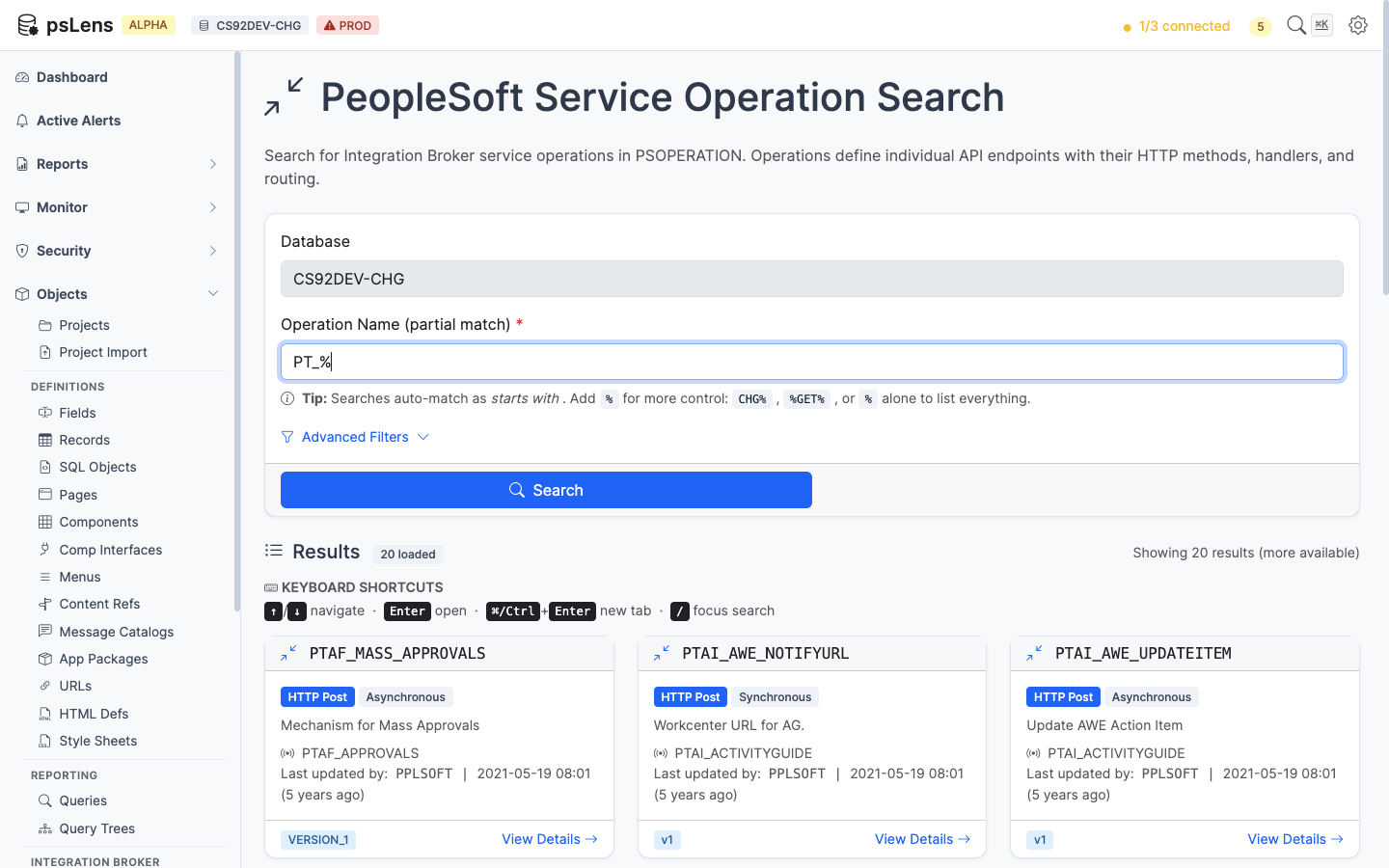
			alt="Service Operation search results for PT_% showing PTAF_MASS_APPROVALS, PTAI_AWE_NOTIFYURL, and others"><figcaption>
			<p>Service Operation search results for <code>PT_%</code></p>
		</figcaption>
</figure>


Wildcard `%` search supported. Each card shows the operation type (Async, Sync, One Way), default version, and active flag.

## Detail Page

URL: `/serviceoperations/{OPERATION}?db={database}`

<figure><img src="/images/screenshots/ib/service-operations-detail.png"
			alt="Detail page for PTBR_BRANDING_DEFINITIONS service operation"><figcaption>
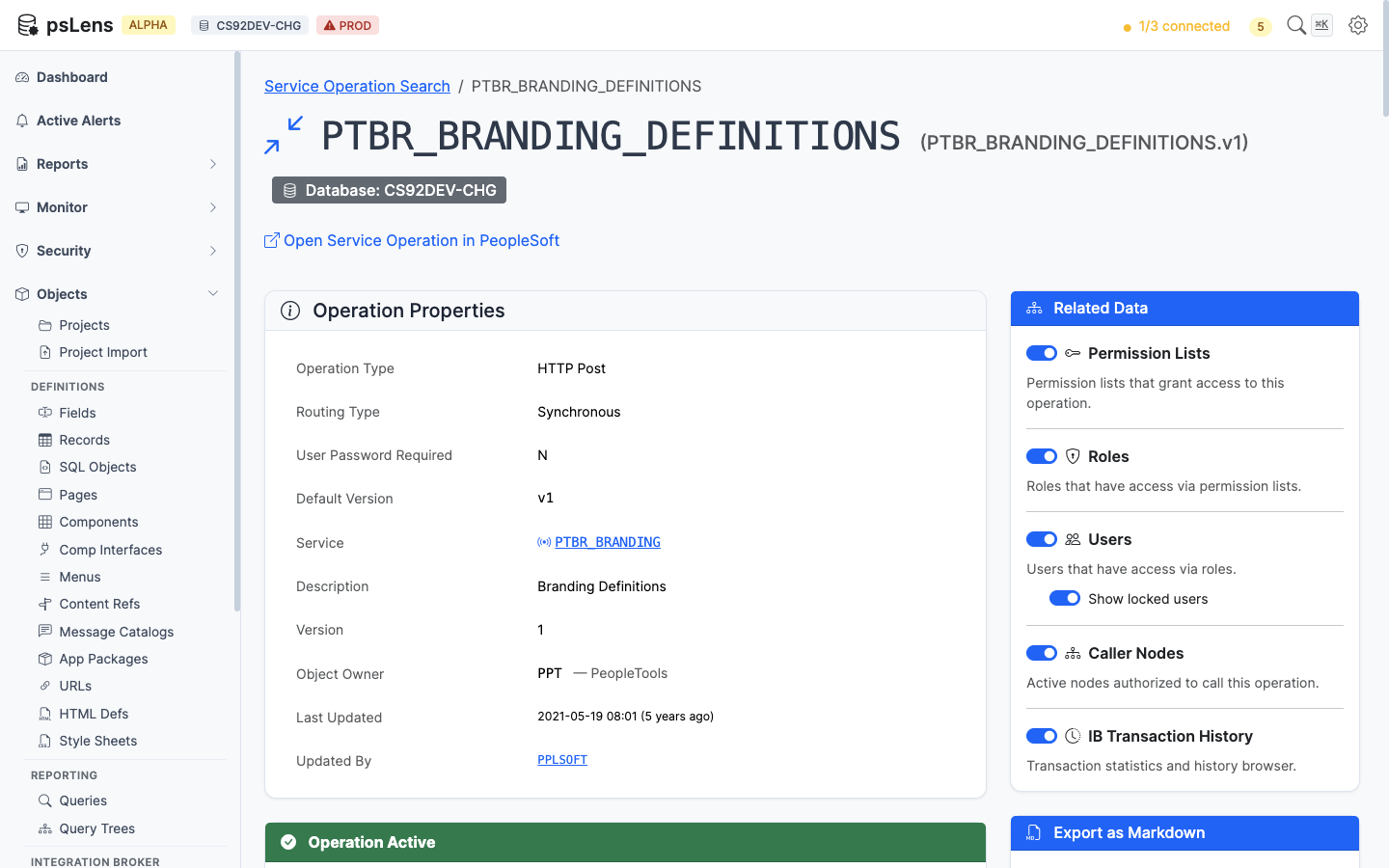
			<p>Service Operation detail page for <code>PTBR_BRANDING_DEFINITIONS</code></p>
		</figcaption>
</figure>


The main pane shows **Operation Properties** plus four always-visible cards: **Versions** (every operation version with default flag and message type), **Routings** (every routing definition with sender/receiver nodes and direction), **Handlers** (handler PeopleCode and class implementations), and **HTTP Request Template** (the template body for HTTP-style transactions). The sidebar has 6 related-data toggles, including three security access lenses, project membership, and a live IB transaction history feed.

## Related Data Panels

### Permission Lists with Access

<figure><img src="/images/screenshots/ib/service-operations-panel-perm-lists.png"
			alt="Permission Lists with Access panel for the service operation"><figcaption>
			<p>Permission lists that grant access to this operation</p>
		</figcaption>
</figure>


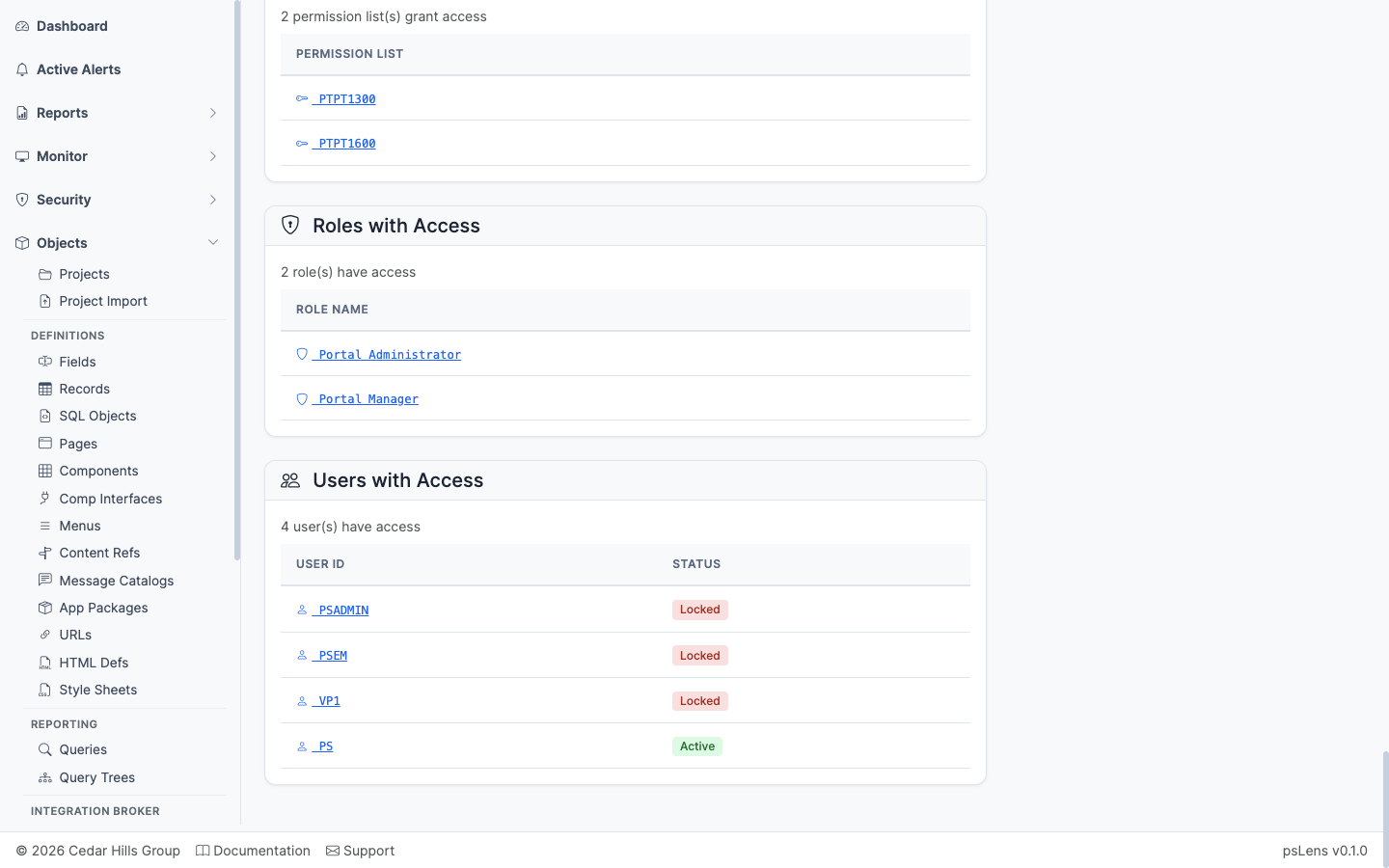
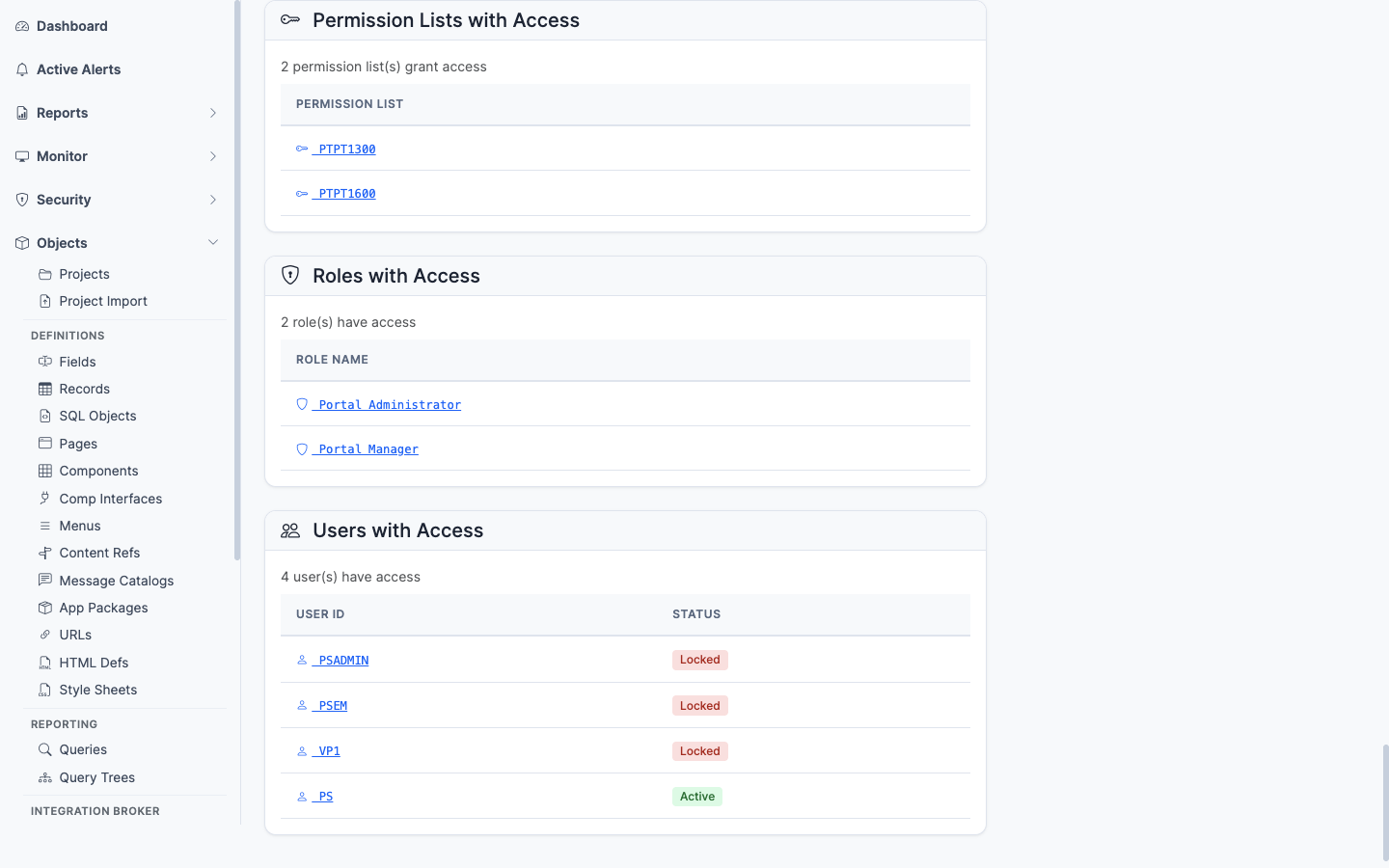
Permission lists with **Full Access** or **Web Library Access** to this operation. The security baseline for which permission lists let a user invoke this operation.

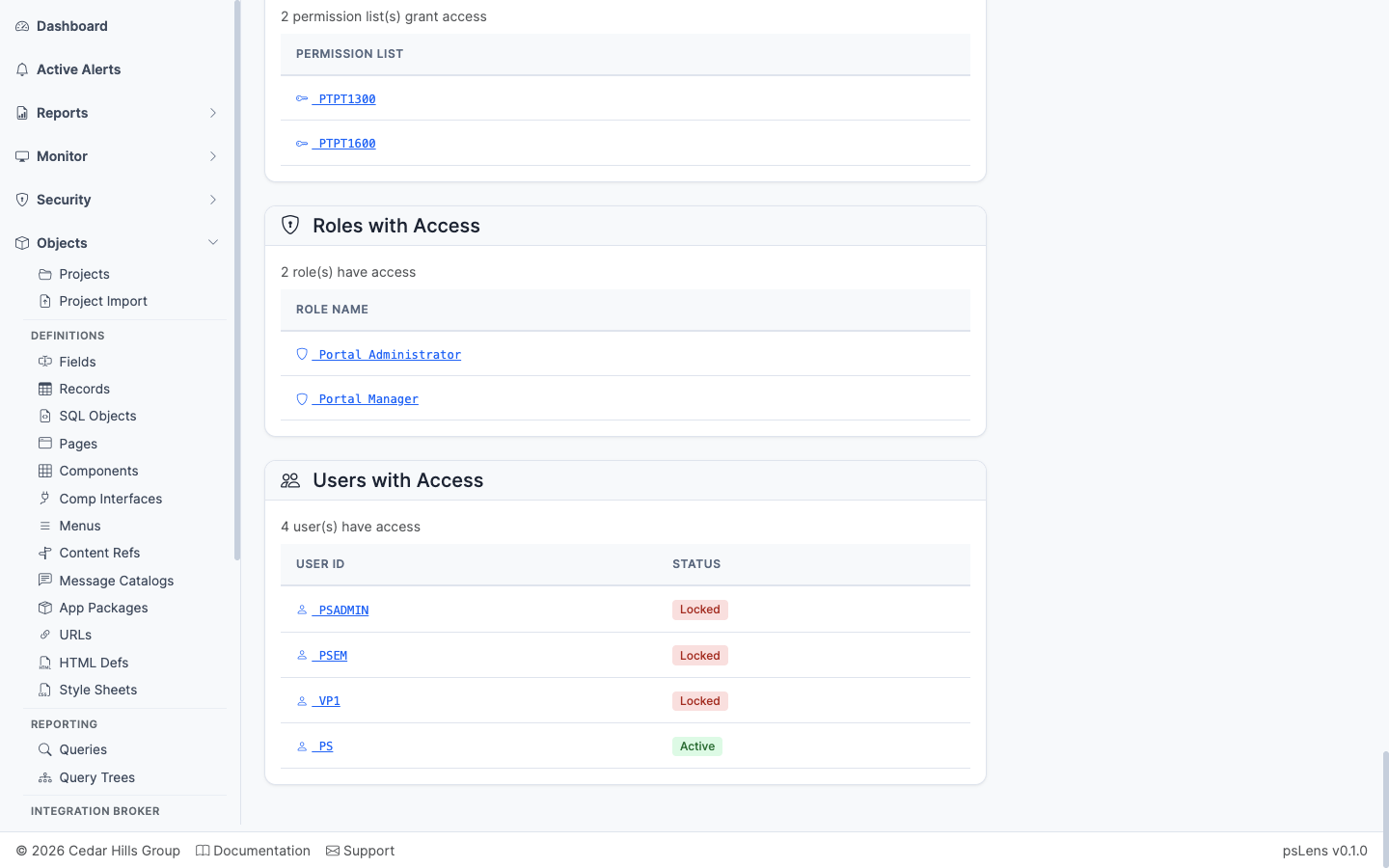
### Roles with Access

<figure><img src="/images/screenshots/ib/service-operations-panel-roles.png"
			alt="Roles with Access panel"><figcaption>
			<p>Roles that contain a permission list granting access to this operation</p>
		</figcaption>
</figure>


The roles that contain any of the granting permission lists — saves you from having to walk Permission List → Role mapping manually.

### Users with Access

<figure><img src="/images/screenshots/ib/service-operations-panel-users.png"
			alt="Users with Access panel"><figcaption>
			<p>Users whose roles ultimately grant access to this operation</p>
		</figcaption>
</figure>


The users whose role membership ultimately grants them access to call this operation, with an optional toggle to include or exclude locked accounts. The end-of-chain answer for who can call this endpoint.

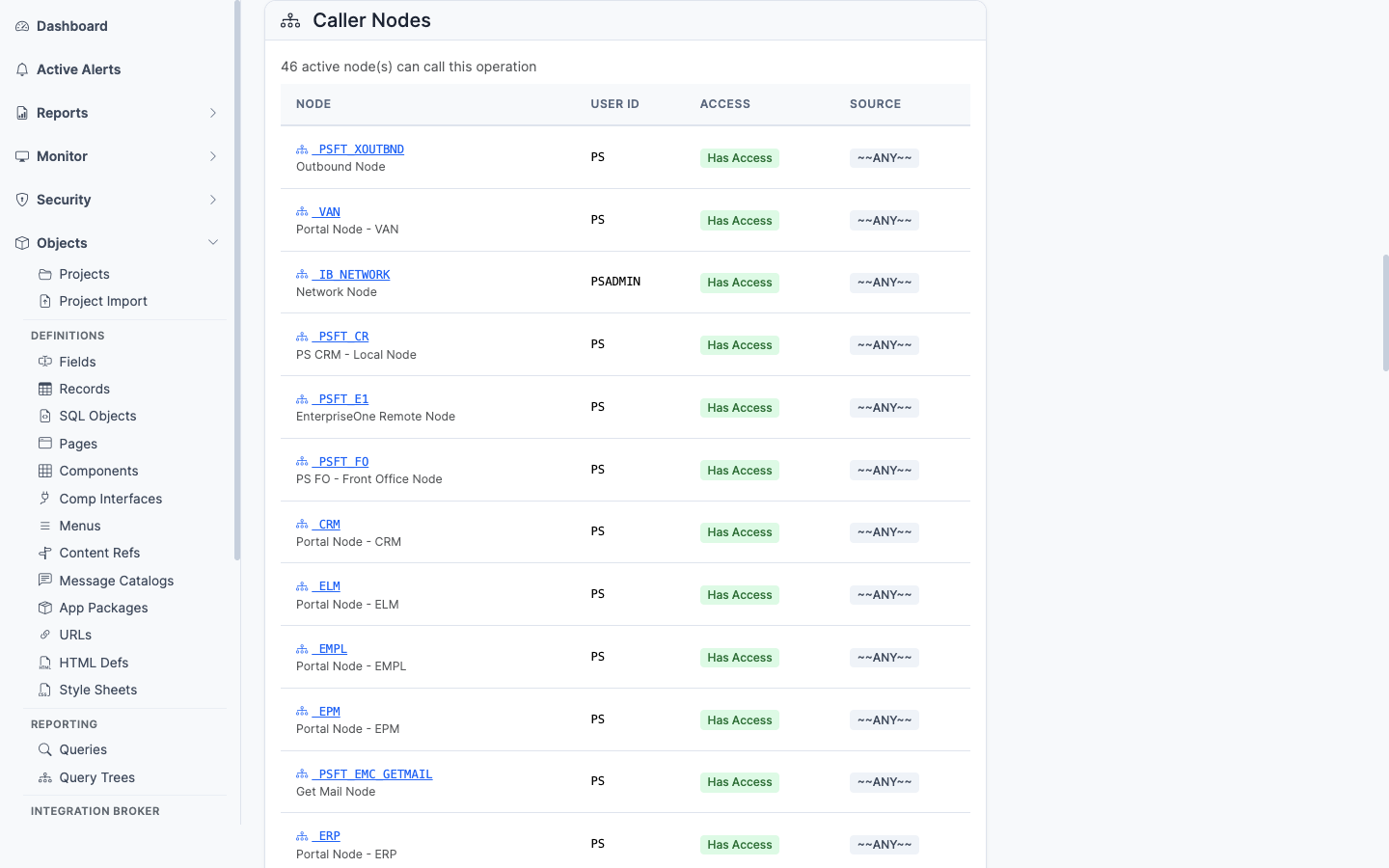
### Caller Nodes

<figure><img src="/images/screenshots/ib/service-operations-panel-caller-nodes.png"
			alt="Caller Nodes panel"><figcaption>
			<p>Nodes whose default user has access to invoke this operation</p>
		</figcaption>
</figure>


Inverts the lens to the integration side: lists nodes whose default user has been granted access to invoke this operation — useful for confirming which external systems can call the endpoint.

### Included in Projects

Application Designer projects containing this Service Operation (`PSPROJECTITEM.OBJECTTYPE = 80`). Shows project name, description, and object owner ID.

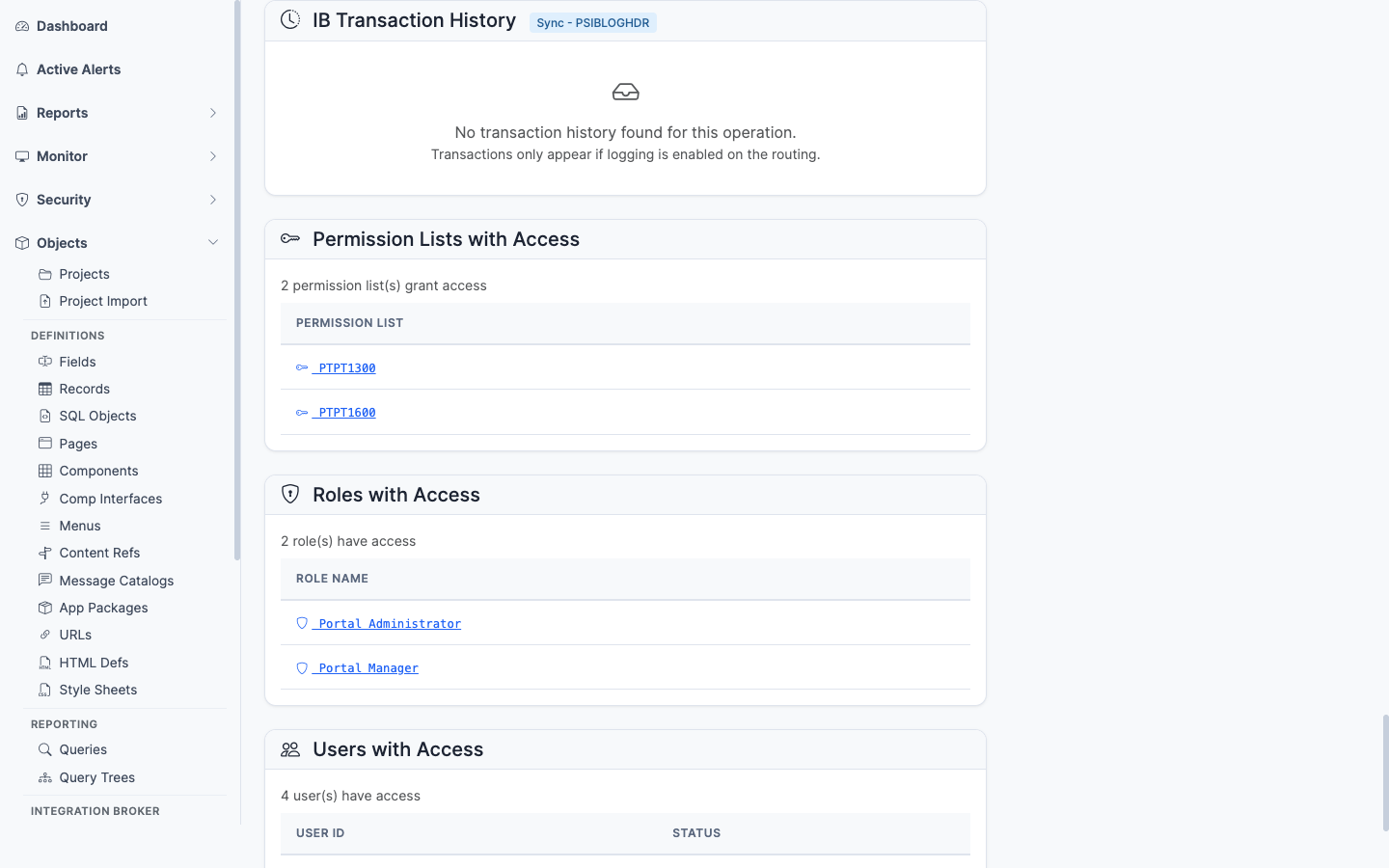
### IB Transaction History

<figure><img src="/images/screenshots/ib/service-operations-panel-ib-history.png"
			alt="IB Transaction History panel"><figcaption>
			<p>Recent runtime invocations of the service operation</p>
		</figcaption>
</figure>


Recent runtime invocations from `PSIBLOGHDR` — timestamps, status, transaction ID. The link from "what is configured" to "what is actually happening." Lets you confirm an operation is being called (or spot that it never is).