# Permission Lists
> Permission lists (PSCLASSDEFN, sometimes called classes) are the lowest-level grantable security object.
---
Site [llms.txt](/llms.txt)
---
## Permission Lists
**URL:** `/permissionlists`
Permission lists (PSCLASSDEFN, sometimes called classes) are the lowest-level grantable security object. Every menu, component, page, and function authorization attaches to one.
Walkthrough: Exploring Permission Lists in psLens
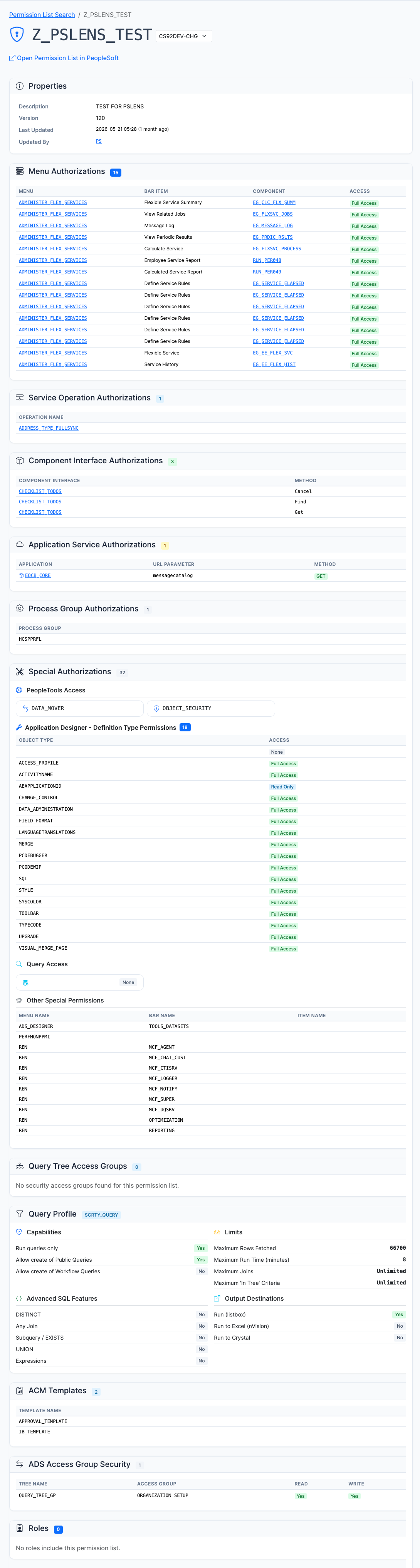
Permission list detail page with the core definition and the access relationships needed for audit work
### What You Can Do
- **View Full Definitions:** See description, last modified information, and general settings.
- **View Authorizations:** See which menus and components the permission list authorizes.
- **Compare Permission Lists (Security Diff Tool):** Compare two permission lists across environments (e.g. `DEV` vs `PROD`) or within the same database at `/permissionlists/compare` (accessible from the **Security > Compare Permission Lists** sidebar menu or search header), analyzing deltas across signon windows, components, action masks, web libraries, service operations, CIs, process groups, and query access groups in a continuous-scroll layout with sticky navigation.
- **View Assigned Roles:** See which roles include this permission list.
- **Sign-on Settings:** View allowed sign-on times and other access constraints.
### When It's Useful
- Auditing what access a particular permission list grants before assigning it.
- Comparing security configurations between environments to identify permission drift.
- Incident response: what could a compromised permission list have touched.
- Finding permission lists that are overly broad (see also the [Full Access Permission Lists report](/docs/reports/security/security-full-access/)).